Skip to content

Training for
the Next Generation

Reduce costs and train your workforce. All in one platform


video-bold

No hunting for content—it's delivered automatically based on role and course assignments.

chats-bold

Turn training into momentum, not obligation.  Learning sticks when people talk about it.

chart-donut-bold

Your crew controls their development while staying aligned with company goals.
calendar-check-bold

Training fits your schedule — not the other way around. Keep everyone aligned, informed, and motivated.

Manage training at scale.

Customize training and keep workforce organized

Track users, assign roles and match work categories to your real operations.
Build your training schedule around your Company Calendar
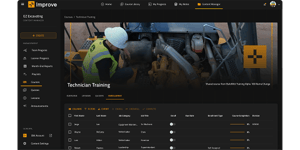
Employee Management

A training platform that reflects your culture and workflows

Add or remove libraries and hide irrelevant courses.
Create custom company content specific to your needs and operation.
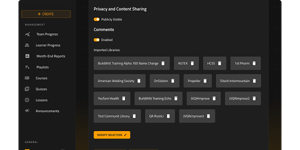
Content Management

Drive engagement
and strengthen culture.

Daily Discussion
Turn training into conversation.

Daily discussion prompts designed to spark crew engagement. Comments on lessons encourage field-driven insights. Communications Hub provides weekly updates, leadership messages, and crew shoutouts.
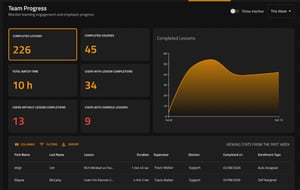
Guessing Who is Engaged
No more guessing who's engaged.

Assignment status visibility and streak tracking connect field and office. Daily participation monitoring and course completion tracking build consistency.

“When it becomes a structured part of your daily rhythm, it becomes a habit

— and people stick with it.”

Adam SwainOwner, 366 Construction

Automation, control, and rewards in one place.

Automatic daily personalized training feed

Keeping training simple and consistent with daily video assignments.
Videos track watch status and completion.
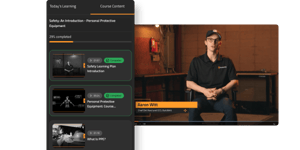
My Feed

A personalized classroom for every crew member

Daily lesson schedule for better time management.
Assignment activity give visibilty to current, upcoming,
and completed lessons.
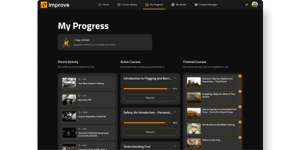
Learning Hub-1
Explore beyond assigned training
✔ Content library allows filtering by BuildWitt or partner content
✔ Browse all available courses and lessons
✔ Discover new skills, certifications, or roles
Take training where ever your crew is
✔ Full synced across devices, iOS & Android mobile apps, along with web browser access
✔ Fully customizable smart notifications
✔ Automatic reminders set to calendar-based delivery
Make learning competitive and fun
✔ Short quizzes reinforce lesson and identify gaps in understanding
✔ Streak recognition and milestone celebrations

✔ Leaderboards offer public recognition and encourage friendly competition

Industry-Leading
Partner Content

BuildWitt partners with the best in construction and workforce development.
Content Partners

Frequently Asked Questions

Is BuildWitt Improve an LMS? BuildWitt Improve is a mobile microtraining platform made specifically for the needs of heavy civil construction and critical infrastructure teams. It has some capabilities in common with an LMS, such as the ability to upload and store your own content, disseminate material to your team, and track learning.

Unlike an LMS, Improve comes with a robust library of content created with industry experts filmed on real job sites. Features have been developed specifically to be used in the field and by management for this industry.

Depending on the needs of your training program, Improve can become a tool to use alongside a traditional LMS or replace the need for an LMS altogether.
Why micro-learning? Modern science has uncovered the power of shorter, more regular learning. It’s part of why short video formats have taken over—the engaging aspects of video combined with short formats keep our attention, improve the retention of information, and are easy to finish even if you’re crunched for time. 
 
We’ve applied these principles to help the Dirt World get better every day without pausing operations or setting their crews up for a feat that’s too grueling (or boring) to accomplish. Each course is broken down into short videos that are just a few minutes long, so they can be watched before shifts, on breaks, or built into daily meetings.
How are others using BuildWitt Improve? Many are using it as a company-wide learning tool to supplement and scale training as well as build a culture of continuous improvement. The simplest way to start integrating it into your routine is during daily meetings—either watch and discuss a short video together or briefly share what people are learning at an individual level. 
Here are other popular ways it’s being used:

  • Rainy day and off-season learning 
  • Getting new hires up to speed & apprenticeship programs
  • Management and leadership training 
  • Cross-training for different crews or new projects 
  • Bridging the field-office knowledge gap 
  • Hours logged for certification requirements
How do I get everyone on my team to buy in?
  • Share the “why” frequently: Let your team know that this will help you reach company goals and get everyone rallied around a shared vision.
  • Share the relevance: Share how it can help team members reach their own personal and professional goals. 
  • Discuss what you’re learning: Make group discussions part of your routine. It’ll help them retain what they watch, spread knowledge, and create group momentum.
  • Celebrate consistency: Create incentives and/or recognition around individual or collective goals that are met.
How do I get content assigned to my team? Content can be assigned to individuals, groups (e.g., by division, job role, site), or the entire company. The platform offers different assignment methods: due date, no due date, and workload budget (drip-feeding one lesson per day). Users can also self-assign content from the library.
What kind of tracking capabilities does it have? BuildWitt Improve has an analytics dashboard to track employee progress, course completion rates, and overall platform engagement. Data can be exported to spreadsheets for further analysis and reporting.

Start Improve Today